I tried looking up some puns about loading for the title of this post, but honestly? Most of them were kind of disappointing and hard to process. But why am I talking about loading?
I felt that loading a level would be the next logical step in making this project. The first step I took was an attempt to pass in the collected data from the menu into the new scene so that the randomly generated level can be made based on the previously entered parameters. Sadly, it seems that there is no super easy way (like just passing some arguments into the function) to do it. The currently available alternatives were to either write my own scene changer or to use a singleton. Initially, I was thinking that there is no way I will use a singleton, since it’s not a great pattern and generally should be avoided. And then after considering that doing a scene changer is probably going to be a slight case of overengineering, I went with the singleton that is loaded before every scene. A nice side effect, that I did not think about at all at first, is that I will not have to worry about where to store all of the data for the following levels.
Now, me talking about not overengineering solutions is a bit ironic, I think. Since I also decided to just introduce asynchronous scene loading/level generation into the play for this update. But I just felt like it would be a cool thing to do (I think I started to understand what happened to my previous project.) In all seriousness, the random level generation can take quite a bit of time, especially if you decide to generate a massive level (here was me locking out my Unity editor when generating a 1000×1000 dungeon for 2.5h) and having a nicely animated loading screen is a nice feature (though mine is far from being called nicely animated). I absolutely love loading screens that wait for you to press “Play” when loaded. I feel like this is an amazing feature that more games should use! While attempting this, my first issue came in when I decided to make a new instance of a node/game object (or a “scene” in terms of Godot, but I find that terminology confusing): my game froze up when I was trying to load the object in an async task. It definitely felt like ruh-roh moment. I moved the first async load back into the main function, but when I tried to load a player prefab my game made a boo-boo and crashed. The interesting part is that it wasn’t my code, kinda, but the engine crash, which I made into a bug report with a small repro project.
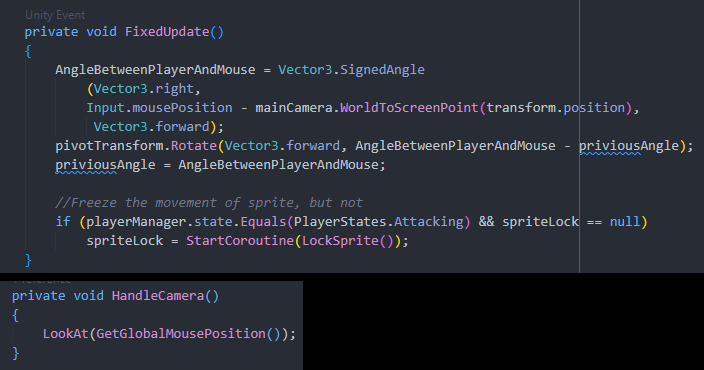
Putting asynchronous loading task aside (ha!), it was refreshing to start anew. Especially doing tasks that I did before, when I had very little game programming knowledge. The main rewrite that stuck with me was rotating the character based on where the mouse is. Seems quite simple, doesn’t it? But then I had no idea I could just set the forward/right vector as the direction and be done with it, thus I had plenty of issues related to. Back then, 2019 August 9th 1:15 PM to be exact (thanks GitHub), I decided to make this (with what I replaced it with at the bottom) :

Bottom The code I used in Godot for same purposes
And the Godot code is just two Godot-provided function calls. Even if I had to write my own code, I think I would have made way more efficient code than what I made 3 years ago.
With the engine change came some new troubles. For my movement I want to add a dash functionality, my old implementation was to to lock player controls and add a massive force impulse towards the desired direction. But now I realized I could just teleport the player to the place they are dashing towards. For that I need a way to cast a sphere/circle collider. In Unity that was quite a simple process, but it seems that I will need to wait for a bit before the Godot implementation reaches me. I think there will be more small snippets like this in the future:


 Martynas Antipenkovas