That’s quite the title, isn’t it? From at least three words above, it is safe to assume that this blog post’s primary focus will be on inputs for the project. I think it is safe to say that inputs are pretty darn significant for games and extra care needs to be put in for things to feel nice and responsive. So this is my progress for the past few months since the last upload.
As a small note, I wanted to mention that I am focusing on playing the game with the gamepad first. As of this moment, I don’t really have any hopes of publishing this on a console I do think that designing with controllers first will be a good way to learn. Furthermore, due to the difference in button count between the keyboard and the controller, designing around a more constrained setup will prove better when transferring the controls into a less constrained setup, similar to how one would try to target a worse-performing platform first.
Inputs setup
When thinking about the controls I took inspiration from 4 games (that I can think of at the time of writing). I was exposed to the concept of extended actions in Phantasy Star Universe games, which to this day I still hold dearly in my heart. In it, the player could hold, among many other things, a magical staff with two actions bound to X and triangle buttons and when pressing R1 they’d get an additional 2 unique attacks! When I first encountered this mechanic, it really impressed me with how cleverly extends its action pallet! Dragon’s Dogma, another game that I really enjoyed, further expanded the concept by having 3 buttons for attacks and one for extension, leading to a grand total of 6 actions that can be executed quickly! So you bet I wanted to add this to my game. And so I did. I’ve assigned LT, RB and RT as action buttons, while LB acts as a way to extend the attack options. The task itself wasn’t too complicated, I just had to make a decision that there will be no aim-down sights (or its equivalent in a top-down game) and instead focus on players having many different abilities and items.
The third game that inspired me is Warframe, specifically its Tigris shotgun. This quite powerful weapon only had 2 rounds. The first one was shot when the fire button is pressed, and the second – when released. In my eyes, this seemingly simple behaviour, which I don’t think I have seen in other games that I’ve played, made the weapon stand out from the crowd. Made it special. Made it feel a bit deeper on a mechanical level. And I want that for my items & abilities. That is why I spent some time on making an input structure in which every single action, of the total 6, has 4 delegates that can be fired off. First – for the initial press, second – for the release, third – for every frame the button is held and the final one gets triggered by the button being held a specific amount of time, which can also retrigger, if one desires. I hope this will enable me to make items that have a bit more variety in the way they are controlled. The fourth game that gave me the confidence to assign the LB, LT, RB and RT to combat actions is Horizon Zero Dawn and its use of a dial pad. When thinking about those four buttons I default to thinking about item switching, that’s what other games like Phantasy Star Univer and Dark Suls do. HZD does that as well, at least for a bit. HZD uses right and left buttons to go through the quick item menu, while the downwards button is used to use said items. I am thinking of using a similar approach. This way during the combat player will have easily accessible 6 combat actions by the use of their index and middle fingers while also being able to control the character’s rotations and movent with their thumbs. And to heal the player will have to move their thumb away from the movement controls, almost forcing them to do this while outside the combat. In my humble opinion, this sounds like a good to add some sense of pacing between the intense combat sections and exploration/gathering bits
Since I am testing with a gamepad it was a bit difficult to nail down the controls by myself, but I found a very useful tutorial about it and ended up with this bit of code:
private readonly float ChangeDeadzone = (0.32f * 0.32f) * 2.0f;

private void HandleMovement()
	{
		Vector2 velocity = new Vector2(
				Input.GetActionStrength("move_right") - Input.GetActionStrength("move_left"),
				Input.GetActionStrength("move_down") - Input.GetActionStrength("move_up"));

		if (velocity.LengthSquared() > ChangeDeadzone)
		{
			velocity = velocity.Normalized();

			CurrentlyControlledEntity.Velocity = velocity * 200;
		}
		else
		{

			velocity = Vector2.Zero;
			CurrentlyControlledEntity.Velocity = velocity;
		}
                // dashing, etc...

	}

	private void HandleCamera()
	{
		// Need to get the screen position since getting global position
		// Will update on move.
		Vector2I displayMousePosition = Godot.DisplayServer.MouseGetPosition();
		// If the mouse position is not changing - use the controllers looks
		if (CachedMousePosition.Equals(displayMousePosition))
		{
			Vector2 lookDirection = new Vector2(
				Input.GetActionStrength("look_right") - Input.GetActionStrength("look_left"),
				Input.GetActionStrength("look_down") - Input.GetActionStrength("look_up")).
					LimitLength(1.0f);
			if (lookDirection.LengthSquared() > ChangeDeadzone)
			{
				CachedRotatable.LookAt(CurrentlyControlledEntity.Position + lookDirection);
			}
		}
		else
		{
			CachedRotatable.LookAt(CurrentlyControlledEntity.GetGlobalMousePosition());
			CachedMousePosition = displayMousePosition;
		}
	}
Brains, controllable entities & seizing control
During my weekly walk to the grocery shop I had an idea which started with “Wouldn’t it be cool…”. I know it’s the standard way of allowing scope creep in, but I just couldn’t help myself. My idea was to have a group of items that would allow play to take control of other entities (mostly enemies, but maybe even destructible items like a table). And the first idea of how this could be implemented was to follow Unreal Engine’s structure of having pawns and controllers, an interface of sorts that allows for the same in-game entities to be controlled by both the player and AI. Obviously, I lack the knowledge, time and experience to recreate the entire system, but I started with 2 classes: the controllable entity and a base brain.
It can be that my brain still hasn’t fully transformed from a component-based system that both Unity and Unreal use, but I am not a massive fan of every item in the scene having only one code script attached to it. That is why I still try to compose my classes and thus made the controllable entity class of CharacterBody2D type and the brain base, which was just a simple class. Meaning that the controllable entity holds the reference to its brains. I already know that this will cause problems in the future, mainly the brain being garbage collected if at any point no controllable entity will be pointing at it, but I think I can deal with this later, since I am still learning the engine and by the time I will be dealing with that issue, I should have more experience. In the meantime I used a stack to keep track of temporary possessions, we will see if that’s going to be enough.
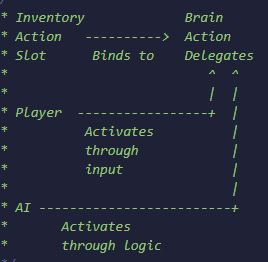
Currently, the base brain class has overridable functions for ticking, possessions and 7 actions, which are stored as variables that I expect to be modified by the items. These variables hold a reference to delegates (For on press, on release, on hold, on hold completed events) and data about the expected hold time and if the hold completed delegate can be retriggered. I even made a small graph through Asciiflow to remind future me how I originally envisioned this architecture.
Dashing/dodging/rolling
I like dodging and rolling in combat. Especially the ones that feel meaningful and you have to utilize often, like in Dark Souls. That’s why I was very keen on implementing it in my game. In the original implementation of my game, I just added an impulse to my character, locked the controls for a bit and ignored all the incoming damage for a few seconds, but I wasn’t particularly happy with how it felt. So this time I decide to use the magic of teleportation.
Back when I was developing the project in Unity there was a very useful collision check called sphere casting, which would project a sphere towards a specified direction and would return stop if it were to hit anything. Obviously, it was more expensive than raycasts, but it was also more reliable when checking if a large object can move in space, exactly what I needed here to see what is the furthest place I can teleport to when dashing. The issue was that Godot 3.x version that I was on didn’t have a 2D version of a shape casting functionality. So I waited and waited, which is why I jumped on other systems before I was done with the initial implementation of the movement. But eventually, I got it! It wasn’t what I expected, since it’s a separate node that I had to add to my player character, meaning it was its own little thing that had to remain unrotated, since it’s targets were defined in local coordinates, which is why I had to modify my movement controls to not rotate the entire character but only its sprite. It also took me quite a bit to understand that ShapeCast2D would calculate itself on the next physics tick or if demanded. I decided to make a small system that will provide data to the ShapeCast2D and make a small note to itself to act on the results in the following frame. I also think that I found some bug within the shape cast calculations which would misreport the closest point sometimes when aiming a wall in a certain direction. I didn’t have the time to get the engine source code and investigate, so I decided to leave it be, for now.
And that’s it, folks! Now I will be focusing on making the first to items to test and expand the systems that I have built.

 Martynas Antipenkovas